
How to Redeem Codes in Build and Defend Your Raft
Shop basket, Redeem field, case-sensitive strings, and the errors that waste a session.
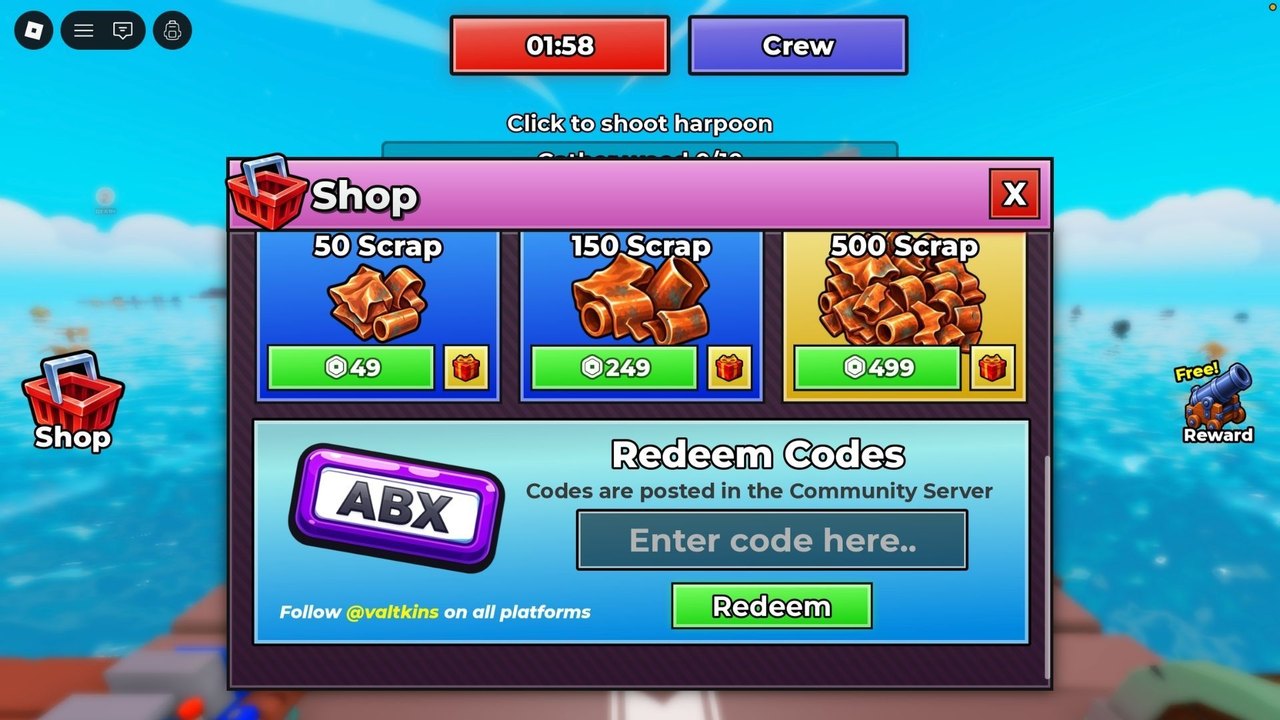
Redeeming a code in Build and Defend Your Raft is a Shop action, not a chat command and not a Roblox website form. The live HUD puts a red basket Shop button on the left. Inside that panel you will see Scrap packs for Robux, a Redeem Codes field with the placeholder Enter code here.., a Redeem button, and a line that says codes are posted in the Community Server. Follow the clicks below in order. As of 31 August 2026 there is nothing valid to paste — the Codes Hub table is empty — but the path itself is what you will use the first Saturday a string actually drops.
Step-by-step redeem
- Join the live experience and wait until the HUD finishes loading. You should see the Shop basket on the left, a timer along the top, a purple Crew button, and the harpoon prompt when you are near water junk.
- Click or tap the red basket Shop button. Do not hunt for a Codes tab in settings; the redeem field lives inside Shop.
- Find the Redeem Codes box. The placeholder text is
Enter code here..with two dots. Click the field so the cursor is active. - Type the code exactly as posted. Treat it as case-sensitive. Do not add spaces before or after. Do not swap letter O and zero unless the post did.
- Press Redeem. Watch the toast or panel message. A success should credit the gift immediately. An error means stop and check the failure list below before you hammer the button.
- Close Shop and confirm the gift in your resources or inventory, then spend it using the order on code rewards.
If the on-screen keyboard covers the Redeem button on mobile, dismiss it and tap Redeem once. Do not paste a second copy of the code on top of the first.
Case, spaces, and other failure modes
Most failed redeems are typing problems, not server drama.
- Wrong case. If the Community Server posts
RaftSatand you typeraftsat, expect a reject. Copy carefully; do not auto-correct on mobile. - Extra spaces. The placeholder invites you to type in a box that looks casual. Leading or trailing spaces still break many Roblox redeem fields.
- Expired or unpublished. GameRant found no working codes and no expired list as of 31 August 2026. A blog that lists five “new” strings with no Shop confirmation is guessing.
- Already redeemed. Codes are typically one redeem per account. A second attempt on the same slot will fail even if the string is still live for someone else.
- Offline or mid-load. If you opened Shop before the raft fully spawned, close it, wait for the harpoon prompt or gather counter, and try once more.
- Stuck field. If Redeem does nothing after a bad paste, leave Shop, reset the character or rejoin the server, and enter the string once with no extra characters.
This wiki will not invent a secret second redeem NPC. If the Shop field is empty of guidance beyond the Community Server line, that is the official path.
Where to find a real code
The Shop copy is blunt: codes are posted in the Community Server. It also says Follow @valtkins on all platforms. Pair that with the Raft Pirates group and the experience’s own Saturday banner. There is no confirmed Discord invite URL and no public Trello card to link here, so do not trust invite screenshots from random videos. After you favorite the game, check the Updates Hub and the Saturday patch notes the same day you check Shop.
Robux Scrap packs (50 / 150 / 500 for 49 / 249 / 499 Robux) are not codes. Buying a pack does not redeem a string, and a string will not replace those prices. Keep the two sinks separate in your head.
After it works
Do not stand on the starter deck admiring a toast. Move the gift into progression: Crafting Table first, then walls and spikes, then raid tools. That spend ladder is spelled out on code rewards. If redeem still fails after a clean retype, assume the table on the Codes Hub is right and the string is dead — then go gather with the harpoon instead of refreshing rumor threads.
The redeem path is short on purpose. One basket, one field, one button. When Saturday finally ships a real code, this page is the click order; the hub is the string; rewards is how you avoid wasting it.
Frequently Asked Questions
Quick answers to the most common raft, raid, and code questions.
Where is the redeem box in Build and Defend Your Raft?
Inside the Shop. Open the red basket on the left of the HUD, then use the Redeem Codes field that says `Enter code here..` and press Redeem.
Are codes case-sensitive?
Treat them as case-sensitive. Type the string exactly as the Community Server or @valtkins post shows it, with no extra spaces.
Why did Redeem do nothing?
Common causes are a wrong case, leading spaces, an expired guess, a code you already used, or opening Shop before the HUD finished loading. Rejoin and try once more, then check the Codes Hub.
Is there a Discord invite for codes?
Not a confirmed public URL. The Shop says codes drop in the Community Server and to follow @valtkins. Watch the Updates Hub on Saturdays as well.