
Shop in Build and Defend Your Raft
Red basket, Scrap bundles, Redeem field, and why we will not invent a Discord invite.
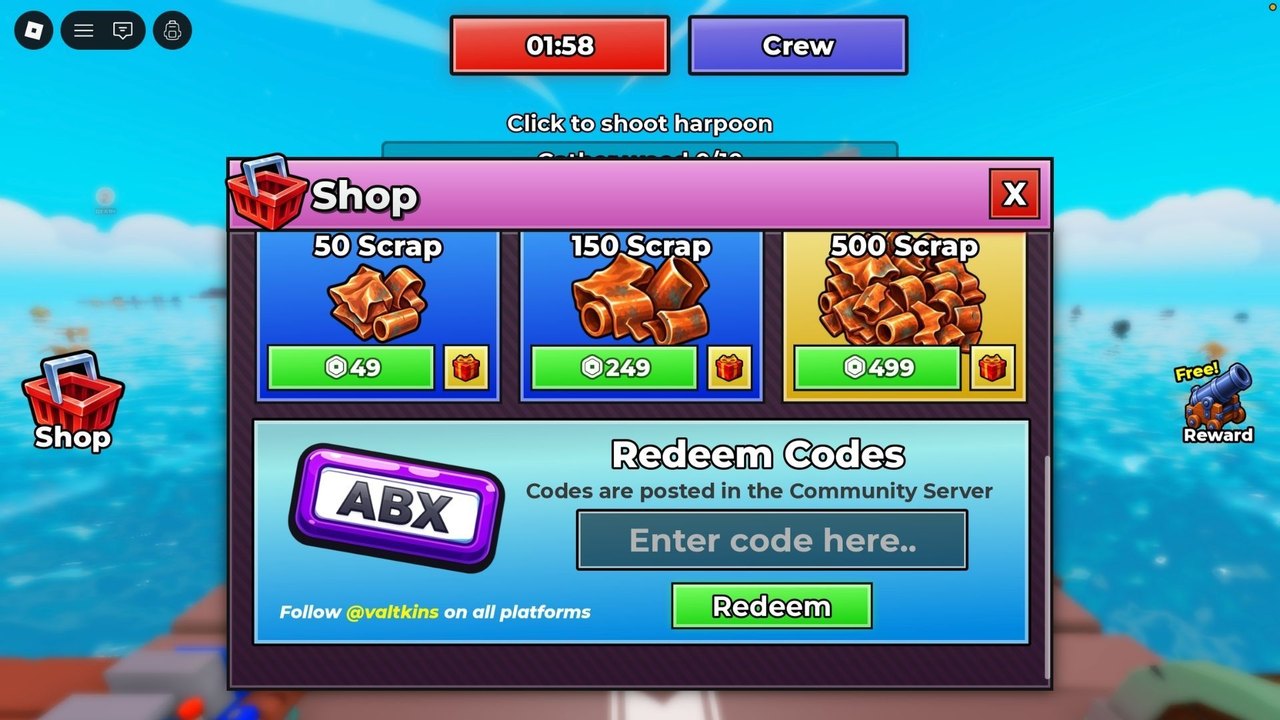
The Shop is the left red basket on the Build and Defend Your Raft HUD. It is not a pause menu and not a Roblox website form. Open it after your tiny raft loads. Inside you get three things we can verify from live screenshots: Scrap packs, a Redeem Codes field, and social copy that says codes are posted in the Community Server and to follow @valtkins. This page is that panel. How to type a string lives on how to redeem. What to do with a gift lives on code rewards. How to farm without paying lives on how to get Scrap.
Raft Pirates released the experience on 28 July 2026 as online PvP (max 18). Saturday is the advertised patch day. The Shop can change copy after a drop; if a price on this page disagrees with the live panel, the panel wins.
How to open Shop
- Join Build and Defend Your Raft and wait until the deck and HUD exist.
- Find the red basket labeled Shop on the left.
- Open it. You should see Scrap tiles, the redeem row, and the Community Server line.
- Close it when you are done. The harpoon still needs you.
If you cannot find Shop, you are not in a settings tab. Look at the left cluster, not the Roblox escape menu.
Scrap packs (49 / 249 / 499 Robux)
Live tiles show 50 Scrap for 49 Robux, 150 Scrap for 249 Robux, and 500 Scrap for 499 Robux. Those numbers were visible in August 2026 Shop captures. Packs are optional. They skip early grind so you can feed the Crafting Table sooner. They do not unlock a secret recipe this wiki is hiding, because we do not have unpublished recipes.
Spend pack Scrap the same way you spend harpoon Scrap: table first, defenses second, raid kit third if someone is sitting home, vanity last. A 499 Robux pier with no walls is still a donation.
Redeem Codes field
Placeholder text reads Enter code here.. (two dots in the capture). Type exactly. Press Redeem. Success or error is a toast, not a Discord bot. As of 3 September 2026 public lists still showed no working codes (GameRant’s empty table from 31 August 2026 had not gained a string). An empty field is still a real field. Do not paste invented slogans. Do not log into a third-party “verify Roblox” page that looks like this Shop.
The panel itself says codes are posted in the Community Server. This wiki does not have a confirmed Discord invite URL. We will not guess one. Follow @valtkins as the Shop-printed crumb. Redeem stays in-client. Track the empty-or-not table on the codes hub.
What Shop is not
- Not Trello. No public board is confirmed.
- Not a script GUI. Loadstrings do not belong here; see scripts.
- Not Meet Frank. The badge is a separate hunt on Meet Frank.
- Not the Free Reward cannon on the right. That widget is a claim, not a store.
After Saturday and the 2 Sep client bump
Favorite the Roblox page. After the weekly Saturday patch — and after odd mid-week client bumps such as 2 September 2026 — reopen Shop before you trust last week’s screenshot. Pack prices, redeem copy, and the Community Server line can move. The latest client update page is the “what we can verify” log; this Shop guide is the panel map.
Open the basket once per session so you know it. Farm with the harpoon. Buy a pack only if the table is starving and you accept the Robux. Redeem only real strings. Close Shop and go back to the deck. That is the whole store.
Frequently Asked Questions
Quick answers to the most common raft, raid, and code questions.
Where is the Shop in Build and Defend Your Raft?
Red basket button on the left of the HUD after the raft loads. It is not the Roblox settings menu.
How much do Scrap packs cost?
50 / 150 / 500 Scrap for 49 / 249 / 499 Robux on the live panel captured in August 2026. Confirm in-game after a patch.
Where do I redeem codes?
In the same Shop, Redeem Codes field. Full clicks are on how to redeem. The list was empty as of 3 September 2026.
Is there an official Discord link in Shop?
The panel names a Community Server and @valtkins. This wiki will not invent a discord.gg URL. See official links.